How to Search EconBiz
Learn how to search EconBiz with topic terms, title fields and filters, then separate a useful citation from a full text you can actually access online.
On this page
Here's how to search EconBiz: start with the main concepts in your economics topic, refine the results by publication year or type, then open a promising record and check its full-text route. You'll need a browser and a topic or known title. A search result can be a citation even when the document isn't freely available.
A result isn't always a downloadable paper
EconBiz searches economics and business literature, including records that point elsewhere for the full text. Finding a record and obtaining the document are separate steps. That's the detail to understand before treating the results as a collection of free PDFs.
EconBiz's official help and information brochure explain its search and access routes. The service can lead you to open material or to content available through a library. If a record has no free download, save the title and publication details instead of assuming the search failed.
My starting choice is a topic search with a few concepts, followed by filters. A long sentence copied from an assignment often includes words that don't describe the subject itself.
How to search EconBiz step by step
1. Write the topic as search terms
Pick the main concept, then add the population, place or relationship you need. For example, a search about equal pay can begin with that phrase and a country.
Use the words researchers are likely to use in titles and subject headings. EconBiz connects subject searching with the Standard Thesaurus for Economics, or STW. That gives you another place to look for a term when everyday wording produces an unhelpful result list.
Don't put every restriction into the opening query. You can narrow by publication type or year after seeing how the subject is represented.
2. Run the search
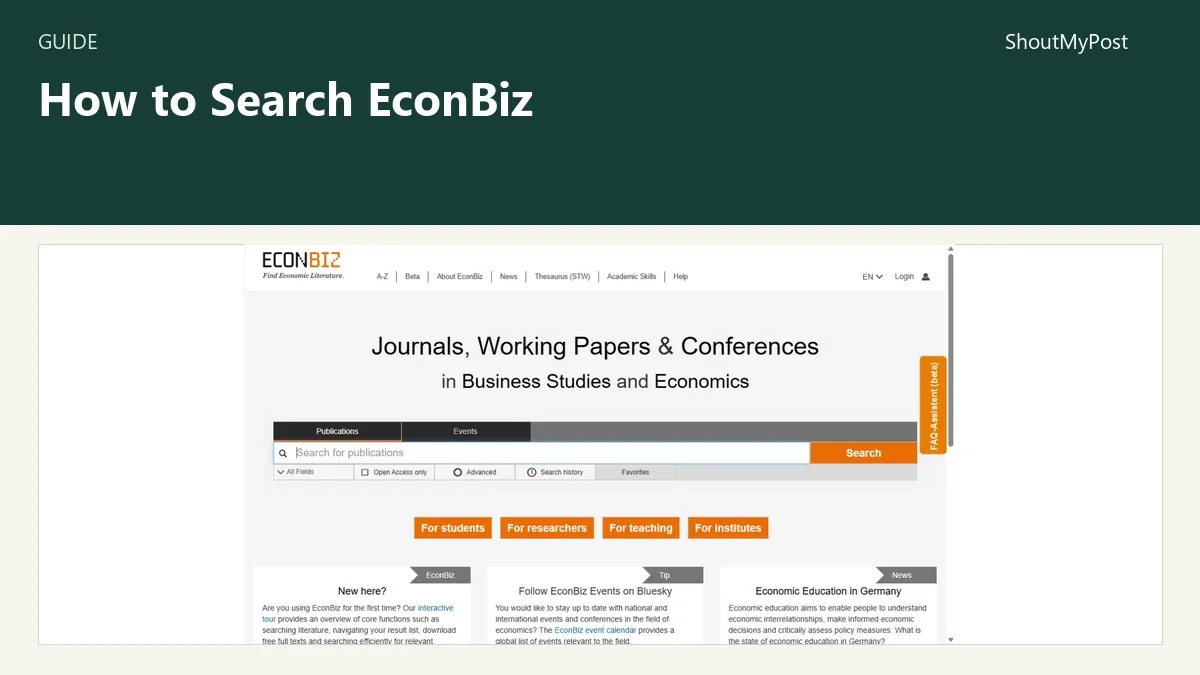
Enter the terms in EconBiz's main search box and choose Search. The homepage also links to Advanced. The basic result list is enough for the first pass through a new topic.
Read several titles before tightening the search. You're looking for whether the results describe the same idea as your question, not just whether they contain one familiar word. The abstract or description, when available, can make that clearer than the title alone.
3. Refine by the document you need
EconBiz's official search comparison guide lists filters including Year of Publication, Subjects, Online availability, Type of publication and Language. Use the one that changes the job you are doing.
If you need recent work, publication year is the direct filter. If you need a book instead of an article, publication type is the direct filter. Online availability helps with access, but limiting too early can remove a citation you still want to discuss with your library.
Change one filter at a time while learning the topic. That makes it easier to tell whether a thin result list comes from the terms, the year range or the document type.
4. Use a field search for a known item
The official Search Keys sheet documents fielded queries. For a known title word, it gives title:happiness. For a subject phrase, it gives subject:"phillips curve".
It also documents description for abstracts/descriptions and subject_stw for STW subjects. Choose the field for the information you already know. A title search and an abstract search ask different questions, even when the word is identical.
For a phrase, use quotation marks around the words. Don't add an unfamiliar search operator because it works in another database; use EconBiz's own sheet for its syntax.
5. Open the record and check access
Read the author, title, year and publication details. Then follow the available full-text route for that record. The destination may be a repository, publisher or library access page.
If your institution supplies access, use its documented login or library route. If the record has an open copy, inspect that file's version and publication details. A working paper and a later journal article can be related without being the same text.
6. Keep the citation beside the file
Save enough information to identify the work again: title, authors, publication year, venue and the record or document link. A file called download.pdf is easy to lose among several papers on the same subject.
I would give the local file a recognizable name while keeping the original citation information in your notes. Your citation should describe the item you read, including its version when that matters, instead of relying on a remembered search query.
Problems you can solve by changing the search
Too many unrelated titles: move a known term into the title field or add a subject term from the result records. A phrase search can also help when the words must occur together.
Too few results: remove a filter before replacing all the terms. A narrow year range plus a publication-type filter can exclude material that would otherwise match.
A citation appears but the PDF doesn't open: check the record's access route. Online discovery and paid or institutional full-text access are separate jobs; the citation can still identify a work your library can help obtain.
The official help texts provide a route to EconBiz's search guidance.
Troubleshooting table
| Problem | Likely cause | Next action |
|---|---|---|
| Broad, unrelated matches | Query uses only a general term | Add a topic phrase or use a documented field |
| Empty or very short list | Terms and filters are too narrow together | Remove the latest filter and rerun |
| Wrong document type | Search mixes books, articles and other records | Use the publication-type filter |
| No free file | Record points to restricted full text | Check institutional access or ask your library |
| Different versions of the work | Working paper and published text are separate records | Match the version to the file you read |
Variations for different research jobs
A known title: start with a title field or the title phrase. Use the author and year to separate similar titles; don't force a topic search to rediscover an item you can already name.
A literature review: keep several terms for the same concept, including STW terms that fit the subject. Record the query and filters used so the next pass can extend that search without guessing what you did earlier.
Open economics papers: EconStor is a subject repository to compare when accessible economics full texts are the goal. Directory of Open Access Books is another route when you need scholarly books across subjects.
Completion checklist
- The shortlisted records answer the same topic question.
- Their publication types and dates fit your reading plan.
- Each saved file has matching citation information.
- Restricted items have a library-access route or are clearly left for later.
For publisher-hosted literature, see Cambridge Core and Project MUSE. For a technical topic, NASA Technical Reports Server covers a different research collection; EarthArXiv serves Earth-science preprints.
FAQ
Does EconBiz provide free full texts?
EconBiz can lead you to free full texts, but not every search record is a freely downloadable document. Some records point to publisher or library access. Use the online-availability filter and inspect the record's access route, then keep its citation even if obtaining the document needs a separate library step.
How do I search only a title in EconBiz?
Use the documented title search key, such as title:happiness. That targets title information instead of a broader search across fields. For a known paper, combine the title evidence with the author and publication year when reviewing the results so you don't confuse similarly named works.
Sources
Official EconBiz help texts, Search Keys sheet, English introduction, information brochure, and EconBiz/Google Scholar search comparison guide, checked October 9, 2026. ZBW's official STW and EconStor information informed the subject and repository context.
Related articles
Directory
Listings in this article
-
EconBiz
EconBiz is a research portal for economics and business studies, run as a service of the ZBW – Leibniz Information Centre for Economics. It supports searching for scholarly information such as journal articles, working papers and conferences worldwide. More than 2 million of its nearly 12 million publications are available directly in Open Access full text. An interactive tour introduces core search functions.